Konala Vadda? · హిడెన్ ఫీచర్ · 12 నవంబర్, 2026
మీ పేరు పిలిస్తే iPhone చెప్తుంది! 🤫 Hidden Setting
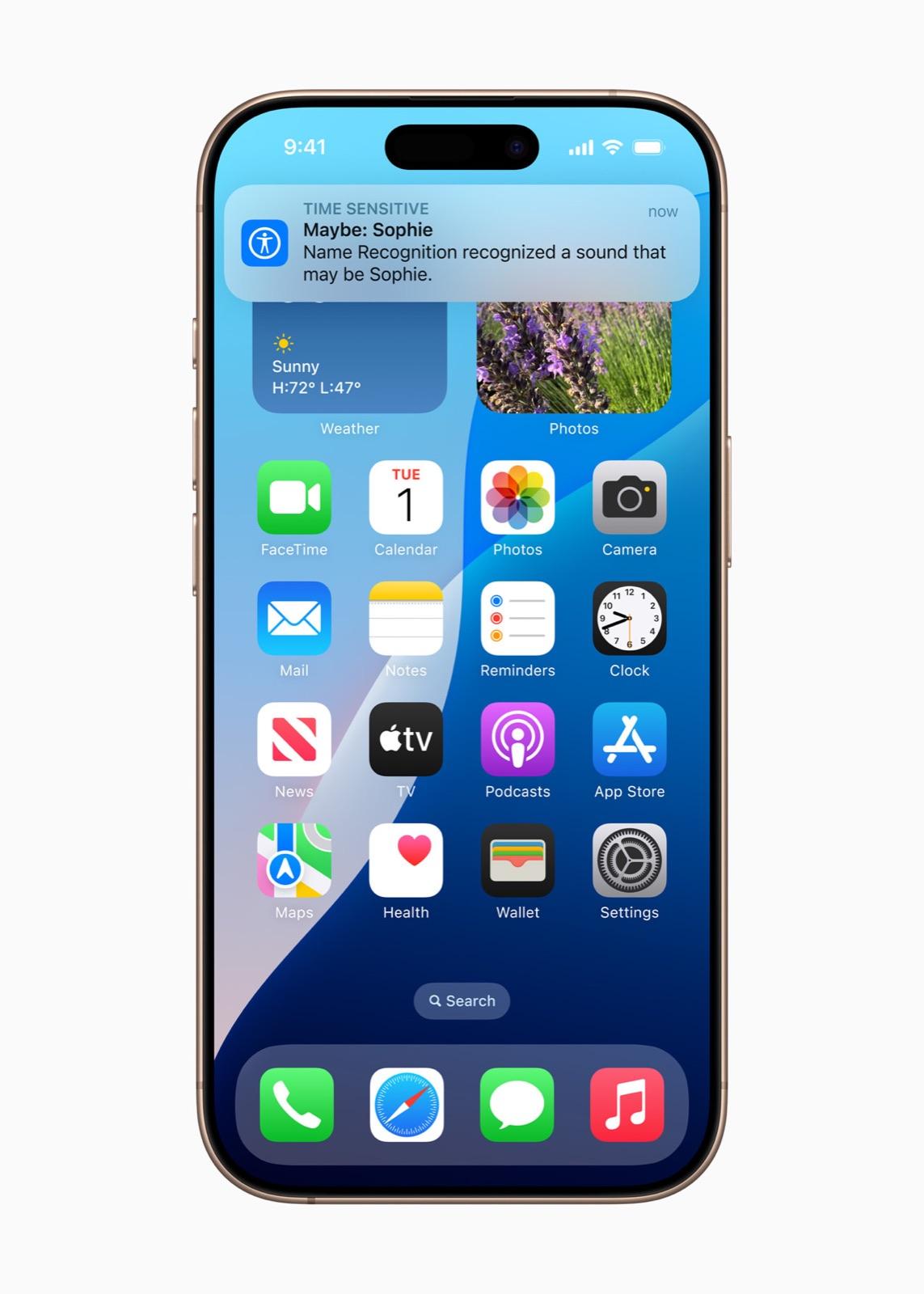
iOS 26 నుంచి iPhone లో Name Recognition అనే setting ఉంది: ఎవరైనా మీ పేరు పిలిస్తే iPhone విని notification ఇస్తుంది. Earphones లో music వింటున్నప్పుడు ఇది బాగా పనికొస్తుంది. ఎలా ఆన్ చేయాలో step by step.
మా verdict
- కొనండి · BUYiPhone (iOS 26 or later)కొత్తగా ఏమీ కొనక్కర్లేదు: మీ iPhone లో iOS 26 లేదా తర్వాతి version ఉంటే ఈ free setting ఇప్పుడే ఆన్ చేసుకోండి. Emergency లో మాత్రం దీని మీద ఆధారపడకండి (Apple చెప్పిన మాట).
Earphones పెట్టుకుని music వింటున్నప్పుడు, office లో అయినా bus లో అయినా, ఎవరైనా మన పేరు పిలిస్తే చాలాసార్లు వినపడదు. iPhone లో దీనికి ఒక hidden setting ఉంది: Name Recognition. ఇది ఆన్ చేస్తే, iPhone మీ పేరు కోసం వింటూ ఉంటుంది, వినగానే notification ఇస్తుంది.
ఇది ఏంటి? (confirmed)
Apple దీన్ని May 2025 లో accessibility features లో భాగంగా ప్రకటించింది: Sound Recognition లో Name Recognition కొత్తగా వచ్చింది, deaf లేదా hard of hearing users కి తమ పేరు పిలిచినప్పుడు తెలియడానికి. Apple Support ప్రకారం Name Recognition iOS 26 and later లో ఉంది. మీ పేరు మీరు లేదా వేరే వాళ్ళు ఎలా పలుకుతారో record కూడా చేయొచ్చు, ఒకటి కంటే ఎక్కువ పేర్లు కూడా add చేయొచ్చు.

ఎలా ఆన్ చేయాలి (iOS 26 / iOS 27)
- Settings app ఓపెన్ చేయండి
- Accessibility నొక్కండి
- Sound & Name Recognition నొక్కండి
- Name Recognition → Set Up Name Recognition నొక్కి, onscreen instructions follow అవ్వండి
- ఇంకో పేరు కావాలంటే: Name Recognition → Add Name
- Tip: త్వరగా on/off చేయడానికి Control Center లో add చేసుకోవచ్చు

Wow number: 50+ languages
Apple May 2026 లో చెప్పిన దాని ప్రకారం Name Recognition 50 కంటే ఎక్కువ languages లో పని చేస్తుంది. Apple feature availability page లో English (India), Hindi (India) ఉన్నాయి. Telugu మాత్రం ఈ రోజు ఆ list లో లేదు. iOS 27 iPhone 11 నుంచి వచ్చిన models కి వస్తుంది (Apple iPhone User Guide).
గుర్తు ఉంచుకోండి: Apple స్వయంగా చెప్తోంది, మీకు హాని జరిగే పరిస్థితుల్లో, emergency లో మీ పేరు గుర్తించడానికి iPhone మీద ఆధారపడకండి.
Verdict
ఇది free setting, కొనాల్సింది ఏమీ లేదు. మీ iPhone లో iOS 26 లేదా iOS 27 ఉంటే ఇప్పుడే ఆన్ చేసుకోండి. మరి ఇంట్లో మిమ్మల్ని ఏ పేరుతో పిలుస్తారు? YouTube comments లో చెప్పండి.
Sources
- Apple Support: Get notified when your name is called on iPhone
- Apple Newsroom (May 2025): Apple unveils powerful accessibility features coming later this year
- Apple Newsroom (May 2026): New accessibility features and updates with Apple Intelligence
- Apple: iOS feature availability (Name Recognition languages)
Images: Apple official press kit (Apple Newsroom). Facts video తో పాటు పైన ఉన్న sources నుంచి; rumours ని rumours గానే చెప్పాము.