I Gave My Robot Dog Offline AI: Three Neural Nets on a Raspberry Pi 5 CPU
Chinnu, my Telugu-speaking robot dog, can now hear, talk, and see — three neural networks running entirely on a Raspberry Pi 5 CPU, with no GPU, no NPU, and no cloud. Including YOLOv8n object detection at ~24 FPS, and a cache that lets the cloud quietly teach the local model.
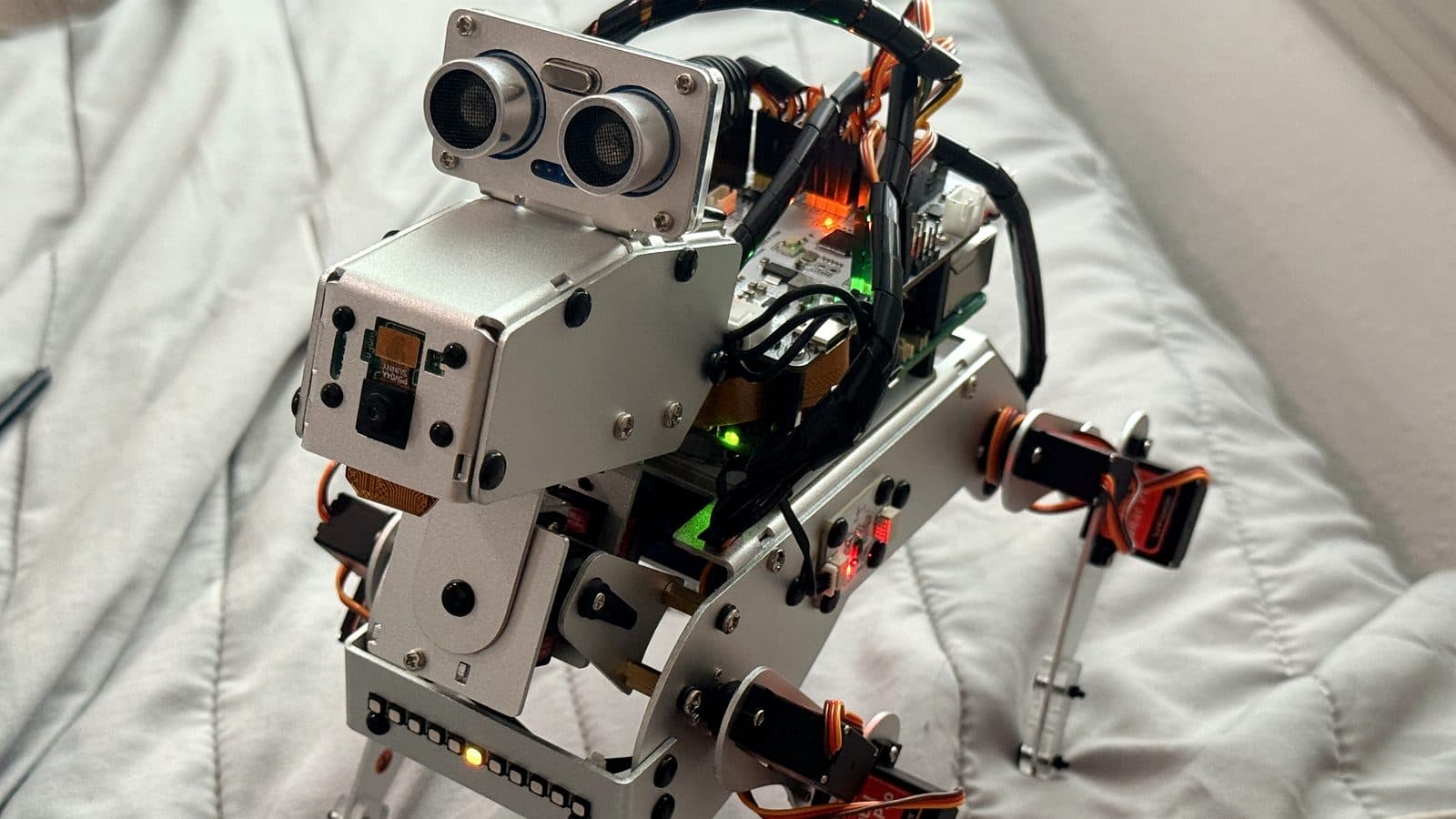
A while back I built Chinnu, a robot dog that understands Telugu commands offline using a tiny model I trained on my own voice. That was one neural net doing one job. Since then it has grown up: Chinnu now hears, talks, and sees — three separate neural networks, all running on the Raspberry Pi 5’s CPU. No GPU, no NPU, no cloud at inference time.
The headline I still can’t quite believe: YOLOv8n object detection at about 24 frames per second on the Pi 5 CPU. That was fast enough that I scrapped my plan to buy an AI accelerator HAT — which, it turned out, physically can’t even fit on the dog. The constraint became the upgrade.
Three tiers, one recipe
Everything Chinnu does on-device follows the same pattern: take a small model, quantize it, export it to ONNX, and run it on the Pi’s CPU with ONNX Runtime. Three capabilities, one repeatable recipe.
- Hearing — a Telugu keyword spotter for the wake word and core commands (chinnu-kws).
- Talking — an offline conversation brain with a Telugu meme-dog personality (chinnu-brain).
- Seeing — real-time object detection on the camera feed (chinnu-vision), the newest tier.
Hearing and talking, powered by hashed n-grams
The keyword spotter and the conversation brain share one surprisingly cheap trick. Instead of heavy audio or embedding models, both run on text features — hashed character n-grams, computed in pure numpy. The wake word and commands run on the speech transcript; so does the chat.
The brain handles 17 intents — greeting, joke, story, name, compliment, goodbye, and the rest. Each question becomes a 1024-bucket vector of hashed character n-grams (CRC32, sizes 3 to 5, L2-normalized), feeds a small MLP (1024 → 256 → 128 → 17), and the whole thing exports to an INT8 ONNX file of about 0.3 MB. Inference is numpy plus ONNX Runtime — no PyTorch on the Pi at all.
# One cheap text feature powers KWS, the intent brain, and the learning cache.
import numpy as np, zlib

def featurize(text, buckets=1024, ngrams=(3, 4, 5)):
    vec = np.zeros(buckets, dtype=np.float32)
    t = " " + text.strip().lower() + " "
    for n in ngrams:
        for i in range(len(t) - n + 1):
            h = zlib.crc32(t[i:i + n].encode("utf-8"))
            vec[h % buckets] += 1.0
    norm = np.linalg.norm(vec)
    return vec / norm if norm else vec   # L2-normalized, numpy only
Why n-grams instead of a real audio or language model? They’re tiny, they run anywhere, and they shrug off Telugu spelling and transliteration variation — the same word typed five ways still lands in the same buckets. One representation ends up powering all three: keyword spotting, the intent brain, and the learning cache below.
Seeing: YOLOv8n at 24 FPS on the CPU
The newest tier is vision. I took YOLOv8n pretrained on COCO — 80 everyday classes like person, dog, cat, ball, chair, bottle, and phone — so there was no data to collect. I exported it to ONNX at 320×320, because on a CPU a smaller input means faster frames.
The runtime is deliberately boring: pure numpy, ONNX Runtime, and OpenCV. Letterbox the frame, run the model, decode the (1, 84, 2100) output tensor, run class-aware non-max suppression, and map the boxes back to the original frame. I mapped the common labels to Telugu — వ్యక్తి (person), కుక్క (dog), పిల్లి (cat), బంతి (ball), ఫోన్ (phone). Live, Chinnu detected a cell phone at 0.82 and a person at 0.67 and spoke a Telugu summary — completely offline.
# Decode a YOLOv8n ONNX output of shape (1, 84, 2100) -> boxes + class-aware NMS.
out = session.run(None, {"images": blob})[0]   # (1, 84, 2100)
preds = out[0].T                                # (2100, 84): 4 box + 80 class scores
boxes, scores = preds[:, :4], preds[:, 4:]
cls = scores.argmax(1)
conf = scores.max(1)
keep = conf > 0.35                              # confidence filter
boxes, cls, conf = boxes[keep], cls[keep], conf[keep]
boxes = unletterbox(xywh_to_xyxy(boxes), ratio, pad)   # back to frame coords
final = nms_per_class(boxes, conf, cls, iou=0.45)      # ~24 FPS at 320 on the Pi 5
Measured throughput is about 24 FPS — roughly 40 milliseconds a frame at 320×320 — on the Pi 5’s CPU. For a pet robot that just needs to notice a person, a ball, or a cat, that is real-time.
The learning cache: letting the cloud teach the local model
My favorite feature started as a request: connect the cloud LLM, but save every new question and answer locally in parallel, so repeated questions get answered locally without the cloud — and over time, Chinnu leans on the cloud less and less.
So every question Chinnu hears flows through three gates:
- The curated intent brain answers first. If it is confident — probability at least 0.85 — Chinnu replies locally and instantly, with no cloud call.
- Otherwise, the learned cache. The question is featurized with the same hashed n-grams and compared by cosine similarity to everything the cloud has answered before; above 0.82, the saved answer is served locally.
- Only genuinely new questions reach the cloud. Chinnu asks GPT, speaks the answer, and saves it — question vector plus answer — so the next similar question stays local.
# Intent brain -> learned cache (cosine) -> cloud, then memorize the new answer.
def answer(question):
    intent, p = brain.predict(question)
    if p >= 0.85:                    # confident curated intent -> instant, local
        return act(intent)
    hit = cache.nearest(featurize(question))
    if hit and hit.cosine >= 0.82:   # the cloud has answered something like this
        return hit.answer            # served locally, no cloud call
    reply = ask_gpt(question)        # genuinely new -> the teacher answers once
    cache.add(question, reply)       # the student remembers it for next time
    return reply
This is just online distillation: the cloud LLM is the teacher, the local cache is the student. Chatting live, the cache grew from zero to seventeen-plus entries — jokes and greetings never touched the cloud, while a new story or a Bhagavad Gita line hit the cloud once and then stayed local for good.
One real gotcha: a closed-set intent classifier is dangerously overconfident on questions it was never trained for. Asked my favorite colour, it confidently forced the question into the eat intent. The fix was two-fold — pack the unknown class with diverse real questions, and add that 0.85 confidence gate so uncertain questions fall through to the cloud and get learned instead of mis-answered.
I kept reaching for more hardware — an NPU, an accelerator HAT, the cloud. A $130 AI HAT couldn’t even fit on the dog, and the Pi 5’s bare CPU quietly did the job. The constraint was the upgrade.
When the hardware fought back
- The speaker buzz wasn’t the speaker. Hours of debugging a buzz during speech — and the text-to-speech was perfectly clean on its own. The noise only appeared when the camera ran at the same time as the I2S HAT speaker: a hardware-level ALSA underrun on the Pi 5. Clean audio and camera together really wants USB audio; in silent vision modes it is perfect.
- A camera-busy ghost. The camera kept failing after reboots with device-or-resource-busy. The culprit was not hardware — a leftover autostart service was grabbing the camera, and 72% of the CPU, on every boot. One systemctl disable and it was gone. Always check what already holds the video device.
- The AI HAT+ can’t go on a PiDog. The tempting upgrade — a Hailo NPU rated at 40 TOPS — needs the HAT+ connector and its own mounting, but the PiDog’s Fusion HAT already owns the GPIO and the space on top. There is simply no room. So I went the other way and ran small models on the CPU.
- Export on the device, not the sandbox. My build sandbox blocked the COCO weights download — it redirects to a GitHub assets host — so I exported the ONNX model on the Pi itself, where the internet is real. On Raspberry Pi OS Trixie, ultralytics needs onnx and onnxslim installed with the break-system-packages flag.
What’s next
The detection boxes open up the fun part: person-following from the box centers, automatic reactions — jump at a ball, bark at a cat — and simple spatial questions like how many people are here, or where the phone is, answered as left, right, or front. And a small USB speaker, so vision and clean audio can finally run at the same time.
None of this is a product, and that is still the point. A Telugu-speaking robot dog that can hear, talk, see, and slowly learn — all of it offline, on a single Raspberry Pi 5 CPU, sitting on my desk. The keyword spotter is open source at github. com/imdhileep/chinnu-kws, with the brain and vision engines alongside it.
Enjoyed this?
Get the next deep dive in your inbox. No spam — just the stories worth reading.
Subscribe to the newsletter