I Built a RAG App With No Vector Database. Here's the Whole Pipeline.
Everyone reaches for a vector DB and embeddings the moment they hear "RAG. " I built DocQA — a Claude-powered document Q&A app — on hand-written BM25, a size-based context switch, and a two-block cached prompt. Here's the real architecture, the numbers that are actually config constants (not benchmarks), and the PDF-parsing bug that ate most of the work.
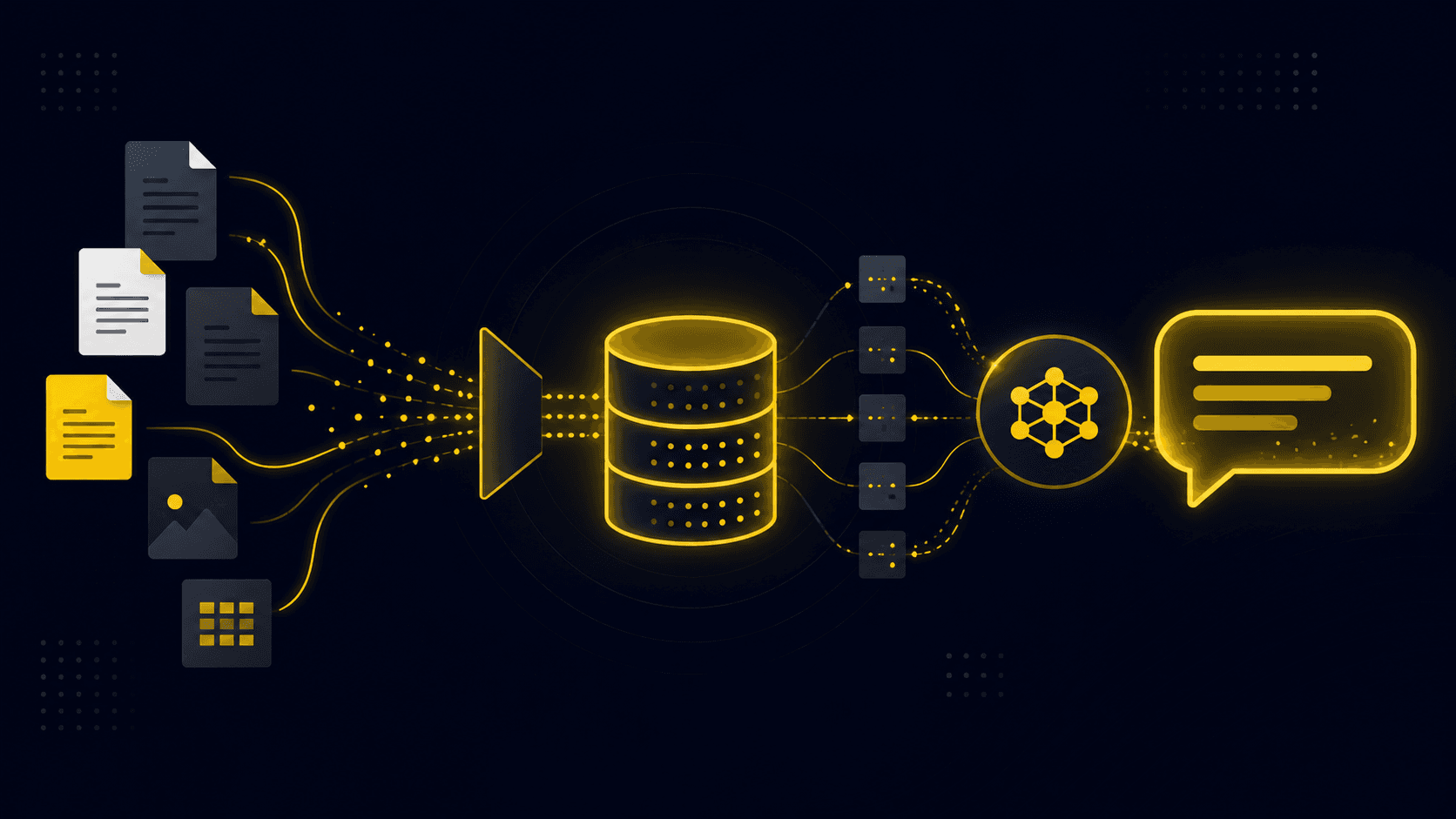
The first time you wire an LLM to your own documents, it feels like a cheat code. Embed the question, pull the nearest chunks, hand them to the model, and out comes a grounded answer with citations. Twenty lines and your model suddenly knows about your data. Then you point it at a real PDF with a real question, and the magic curdles: it cites the wrong page, misses the obvious answer, or invents a citation that points at nothing.
I know this because I built the thing. DocQA is a small Claude-powered web app I wrote — drop in a PDF, TXT, or Markdown file, ask questions, get answers grounded in the document with clickable inline citations that jump back to the exact source passage. What surprised me is how little of the work was the part everyone talks about. There is no vector database in DocQA. No embeddings. No Pinecone, no Chroma, no FAISS. And it still answers grounded questions with citations. This post is the actual pipeline, the design decisions I made and why, and the one bug that ate more of my week than the entire retrieval layer combined.
The pipeline, minus the parts you don't need
Strip the acronym away and RAG is one idea: don't make the model recall facts, look them up and put them in front of it. The model's job shifts from remembering to reading, and reading a passage you handed it is something these models are genuinely good at. DocQA does this in four steps, and I made a deliberate choice at each one to reach for the boring option first.
- Extract — the browser pulls text out of the uploaded file with pdf. js, entirely client-side. (This step is where the war was actually fought. More below. )
- Chunk — a page-aware, overlapping chunker splits the text: ~1600 characters (roughly 400 tokens) per chunk with 200 characters of overlap, preferring to break on paragraph and sentence boundaries.
- Select context — and here DocQA branches on document size instead of always retrieving. Under 120,000 characters, the whole document goes into the prompt. Over it, BM25 retrieval kicks in and pulls the top 8 passages.
- Generate — the question and context POST to an Express server that owns the Anthropic key, which builds a strict "answer only from these excerpts, cite [n] inline" prompt and streams Claude's answer back token by token.
That size branch is the most important design decision in the app, and it's the one I never see in RAG tutorials. Naive RAG assumes you always retrieve. But retrieval exists to keep token cost bounded when the document won't fit — it is a cost decision wearing a relevance costume. If the document is small enough to fit comfortably, the best retriever in the world is the whole document, because then the model sees everything and can't miss a passage that ranked ninth.
Why full-document mode is cheaper than it sounds
The obvious objection to stuffing the whole document into the prompt is cost: you pay for those input tokens on every single question. That would be true if I sent the document naively. Instead, in full mode DocQA puts the document text in a second system block marked with cache_control ephemeral. The stable instruction block comes first; the volatile document block comes second and gets cached.
const system =
  mode === 'full' && context
    ? [
        { type: 'text', text: SYSTEM },
        {
          type: 'text',
          text: 'DOCUMENT EXCERPTS:\n\n' + context,
          cache_control: { type: 'ephemeral' },
        },
      ]
    : SYSTEM
The first question about a document pays full price to write the cache. Every follow-up question reads that cache at roughly 10% of the normal input cost while the model still sees the entire document. I want to be precise about that number: the ~10% figure reflects Anthropic's published prompt-cache pricing, not a benchmark I ran — DocQA has no performance measurements in it at all. But the architectural point stands. Prompt caching flips the economics of full-context mode, and the 120k-character cutoff is just the line where I decided retrieval becomes worth the loss of full visibility. Below it, the model sees everything cheaply. Above it, BM25 keeps the bill bounded at the price of the model only seeing eight passages.
Retrieval is 30 lines of BM25, not a vector store
When a document does exceed the limit, DocQA retrieves with a hand-written Okapi BM25 — the classic lexical ranking function, with its own tokenizer and stopword list and no dependencies. Same k1 = 1.5 and b = 0.75 constants you'd find in a textbook. If no chunk matches the query terms at all, it falls back to the first k chunks so the model always has something to read rather than nothing.
const k1 = 1.5
const b = 0.75
for (const term of q) {
  const f = tf.get(term)
  if (!f) continue
  const n = df.get(term) || 0
  const idf = Math.log(1 + (N - n + 0.5) / (n + 0.5))
  const denom = f + k1 * (1 - b + (b * toks.length) / Math.max(avgdl, 1))
  score += idf * ((f * (k1 + 1)) / denom)
}
I'll be honest about the trade-off, because it's the standard knock on BM25: it's lexical, not semantic. It matches shared words. "How do I cancel? " and a passage titled "ending your subscription" are close in meaning but far apart in the words they use, and pure BM25 can miss that connection where an embedding model would catch it. For a document Q&A tool over a single uploaded file, that's a trade I was happy to make — the user's question and the document usually share vocabulary, and shipping zero dependencies and zero infra beat chasing the last few percent of recall. When it doesn't, the fix is a known one: store a vector per chunk and rank by cosine similarity behind the same function signature.
I know that seam works because I built it a second time. In a separate project, SelfMind — a Claude assistant with a persistent memory loop — I used the exact same pure-Python BM25 (same k1, same b) to retrieve relevant memories from a SQLite store, and deliberately isolated it behind a single rank(memories, query, k) function so an embedding retriever could drop in later without touching the agent or the store. Two projects, same conclusion: BM25 is the honest baseline you reach for embeddings *from*, not the thing you skip on your way to a vector DB.
There is no vector database in this app, and it still answers grounded, cited questions. The quality of a RAG answer is decided long before the model sees a token — in how you chunk, how you select context, and how hard you force the model to stay grounded.
The bug that actually mattered: pdf. js gives you garbage text
Here is what nobody warns you about when they show you the twenty-line RAG demo: the demo assumes clean text. Real PDFs do not give you clean text. pdf. js hands you a stream of tiny positioned fragments, and if you do the obvious thing — items. join(' ') — you get spaces jammed into the middle of words and words fused together where there should be a break. This is the part of the pipeline that ate most of my time, and it has nothing to do with LLMs at all.
The fix was to stop treating PDF text as text and start treating it as geometry. For each fragment, DocQA inspects the x/y position, width, and font size to decide whether the gap to the next fragment means a space, a newline, or nothing. And there's a wrinkle I hit specifically because I also work with Telugu: complex scripts pack their glyph clusters with no space between them, so a naive gap threshold shatters the words. For 'tight' scripts — Indic, Thai, Lao, Arabic, CJK, Hangul — DocQA raises the word-break gap threshold from 0.25x the font size to 0.9x, because in those scripts the only real word breaks arrive as literal space characters.
const tight =
  isTightScript(edgeCp(prev.str, true)) || isTightScript(edgeCp(it.str, false))
const spaceThreshold = tight ? 0.9 : 0.25

if (dy > fontSize * 0.5) {
  out += '\n' // new line even though hasEOL wasn't set
} else if (gap > fontSize * spaceThreshold) {
  out += ' ' // genuine inter-word gap
}
// otherwise the fragments are contiguous -- concatenate with no space
To be clear about the honesty line here: that Telugu rationale is a real design decision documented in the code, not a benchmark. I don't have a test corpus proving the extractor's accuracy — I'm describing why the code is shaped the way it is, not claiming a measured win. Then there's the other PDF gremlin: subsetted fonts map glyphs into the Unicode Private Use Area, which renders as black 'tofu' boxes. DocQA runs a codepoint sanitizer that drops the Private Use Area (U+E000–F8FF), control characters, block-element boxes and U+FFFD, while letting genuine scripts through untouched. None of this is glamorous. All of it decides whether retrieval has anything real to retrieve over.
Making the model stay honest
The last mile is grounding, and it's a contract, not a vibe. The system prompt forbids outside knowledge in as many words: if the answer isn't in the excerpts, say you couldn't find it — never use outside knowledge or guess. That single instruction is the most effective guard against confident hallucination I've deployed, and it costs nothing.
But instructions aren't enough on their own, because the model can still emit a citation marker like [9] when it was only given eight sources. So there's a code-level backstop: the renderer clamps any [n] where n is greater than the number of sources back to plain text, so a hallucinated citation can never become a dead, clickable chip. The citation rendering is also defensive by construction — the Markdown is HTML-escaped first, then a constrained subset (bold, italic, code, lists) is re-applied and only then do the [n] markers become citation buttons, so no untrusted HTML from the model ever reaches the DOM.
That grounding contract is worth stealing even if you take nothing else from DocQA: "answer only from the excerpts, cite your sources, and admit when the answer isn't there" is a rule you can actually write evals against. I haven't — DocQA ships no eval suite, and I won't pretend otherwise — but it's precise enough that faithfulness and citation-accuracy become measurable targets. The industry reflex is that RAG means embeddings means a vector database, and for a lot of systems that's genuinely the right call. But two of my own projects landed on lexical BM25 and shipped, and the reason is worth internalizing: retrieval quality was never the bottleneck. Getting clean text out of the PDF was the bottleneck. Deciding when *not* to retrieve was the leverage. Forcing the model to stay grounded was what made answers trustworthy. The embedding model was, for my use case, a solution to a problem I didn't have yet.
- Don't always retrieve. If the document fits, put it all in the prompt and cache it — the model can't miss what it can see.
- Chunk on structure, not on a fixed character count, and carry metadata (like page numbers) through every chunk so citations can name a source.
- Budget your time for extraction, not retrieval. On real PDFs, parsing is where the quality is won or lost.
- Make grounding a contract enforced in two places: an instruction that forbids outside knowledge, and code that refuses to render a citation the model made up.
- Reach for BM25 first. It's a few dozen lines, zero dependencies, and it's the honest baseline you upgrade to embeddings *from* — behind an unchanged rank() interface — the day recall actually becomes your problem.
The teams who win with RAG aren't the ones with the fanciest retrieval stack. They're the ones who treat retrieval as one engineering problem among several — and often not even the hardest one. Get the text clean, decide honestly whether you need to retrieve at all, force the model to stay grounded, and you can make a model speak fluently about a document it was never trained on. You might be surprised how far you get before you ever install a vector database.
Enjoyed this?
Get the next deep dive in your inbox. No spam — just the stories worth reading.
Subscribe to the newsletter